Passing Parcelable / Serializable and Other Data in Jetpack Compose Navigation
By Wajahat Karim • 08.Mar.2021

NOTE: The Jetpack Compose team doesn’t recommend passing
Parcelablein the navigation composable routes. Instead the route structure in Navigation Compose has the best analog with a restful web service so developers should usebookDetails/{bookid}notbookDetails/{a whole set of fields representing a book}which is essentially what passing aParcelableis doing. There’s a new issue created to update the official Google Docs to explain the best practices for passing complex arguments likeParcelablein the composable routes. You can see it on this Issue Tracker link.
While trying to create a simple demo UI of a books app concept, I stumbled upon an issue where I had to pass the Parcelable in another Composable screen through Navigation. On looking at the official documentation of Jetpack Compose Navigation, which is at the 1.0.0-alpha08 at the time of writing this article, I found that Jetpack Compose allows many different kind of arguments to be passed.
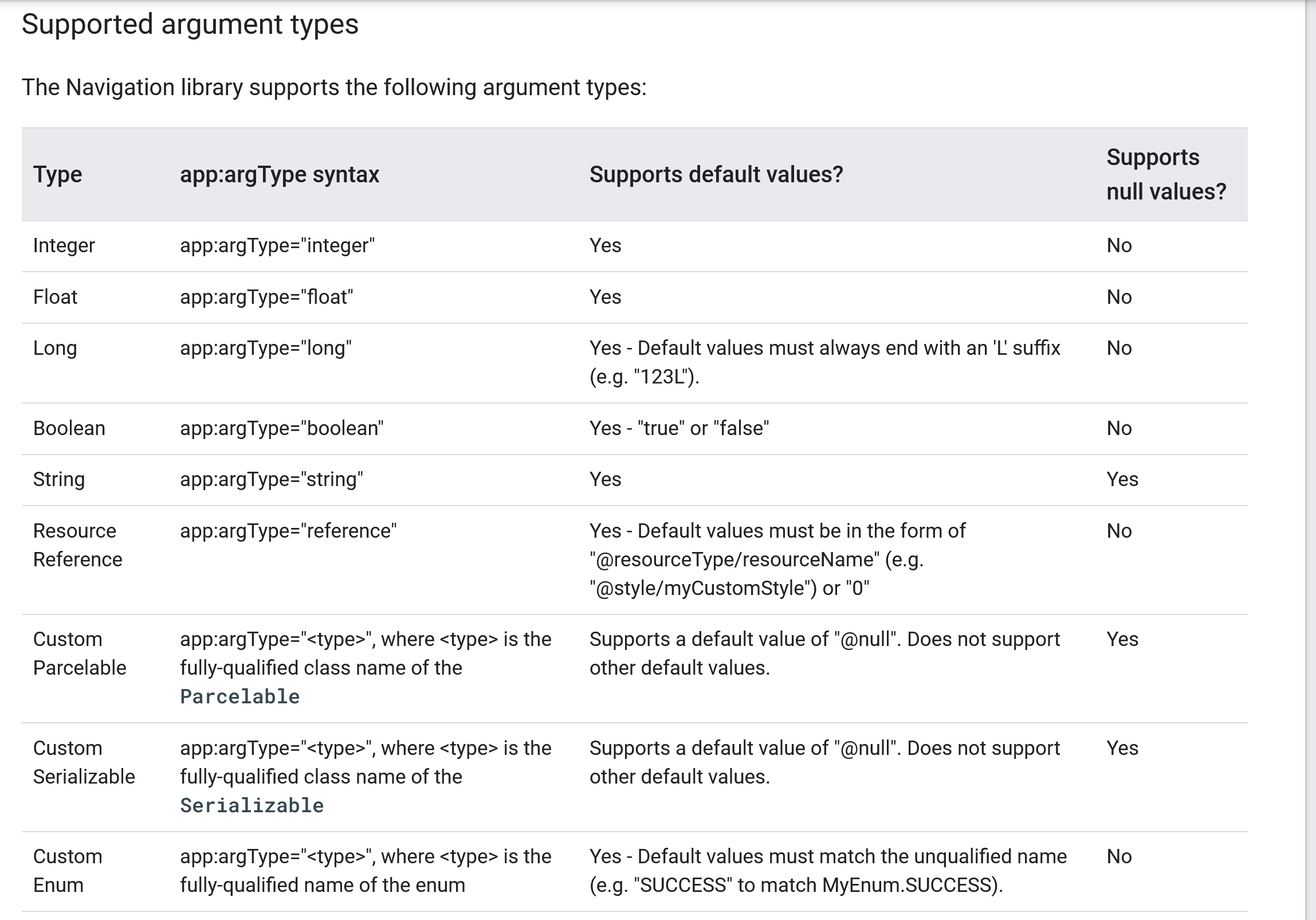
There're two methods to pass the data between Composable through Navigation.
Android Recommended Way
In your main class, where the whole NavHost graph is being defined, declare which Composable will expect what kind of arguments and what their keys will be.
NavHost(startDestination = "home") {
    // Home
    composable("home") {
        HomeScreen(navController)
    }

    // Book Details
    composable(
        "bookDetails/{bookId}",
        // Fetching the argument which has been passed
        arguments = listOf(navArgument("bookId") { type = NavType.StringType })
    ) {
        // Using that argument in the destination Composable
        BookDetails(navController, backStackEntry.arguments?.getString("bookId"))
    }
}
You can see how we are declaring the arguments through navArgument list and telling compiler that it should expect a bookId of the String type value from the NavigationController. And then that argument is being passed to the actual BookDetails() Composable method by getting the value from backStackEntry.arguments field.
Now, when we want to navigate to the bookDetails Composable screen, we can pass our bookId like this:
val navController = rememberNavController()
val bookId = "12456"
val dest = "bookDetails/" + bookId
navController.navigate(dest)
You can read more about this here. But I found an issue with this method that I have to manually serialize the Parcelable object in the String. If I don't do that, the Jetpack Compose Navigation will simply try to do this by calling toString() method, which didn't worked for my case. In this StackOverflow question, there's explained a workaround for this.
A Workaround for Parcelables
In your main class, where the whole NavHost graph is being defined, instead of declaring which Composable will expect what kind of arguments, simply do this:
NavHost(startDestination = "home") {
    // Home
    composable("home") {
        HomeScreen(navController)
    }

    // Book Details
    composable("bookDetails) {
        // Directly extract the argument from previousBackStackEntry
        var bookModel = navController.previousBackStackEntry?.arguments?.getParcelable<BookModel>("book")

        // Using that Parcelable in the destination Composable
        BookDetails(navController, book = bookModel)
    }
}
You can see how we are actually doing almost similar of Arguments approach in a different way by extracting the Parcelable from the previousBackStackEntry. And when we want to navigate to the bookDetails Composable screen, we can pass our book Parcelable like this:
navController.currentBackStackEntry?.arguments?.putParcelable("book", bookModel)
navController.navigate("book_details")
You can see this method implemented in my simple Books UI demo app available at this link.
{{% linkpreview title="wajahatkarim3/ComposeBooksDemo" subtitle="A repository for the talk to create a UI in Jetpack Compose - wajahatkarim3/ComposeBooksDemo" link="https://github.com/wajahatkarim3/ComposeBooksDemo" thumbnail="https://avatars.githubusercontent.com/u/8867121?s=400&v=4" %}}